Phishing Operators Build Redundant Remote Control Through Legitimate IT Platforms
Threat actors are abusing legitimate remote-management software in a multi-stage phishing campaign that gives them persistent control over Windows systems while allowing malicious activity to resemble ordinary IT administration.
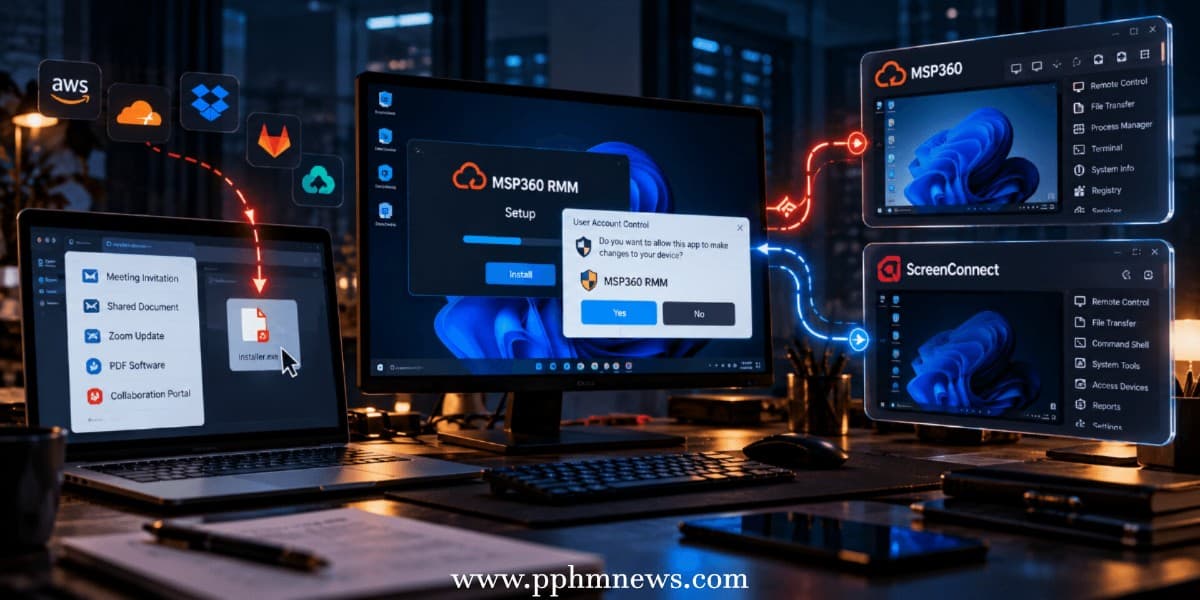
Microsoft observed the operation across multiple industries in July 2026. Attackers initially deployed MSP360 RMM, then used that foothold to silently install ConnectWise ScreenConnect, creating two independent remote-access channels.
The campaign demonstrates an increasingly important defensive problem: malicious software is not always required when legitimate administrative tools already provide remote execution, file transfer and persistent access.
Business Lures Deliver a Signed Installer
Attackers used phishing pages impersonating common workplace services, including meeting invitations, document-sharing portals, Zoom installations, PDF software and collaboration platforms.
Trusted Cloud Services Host the Payload
Payloads were distributed through attacker infrastructure alongside legitimate services such as Amazon S3, Cloudflare R2, Dropbox, GitLab and Supabase.
The downloaded files used deceptive names but ultimately delivered a legitimate, digitally signed MSP360 RMM 2.5.0.67 installer.
UAC Approval Establishes the Foothold
Once a victim approved the Windows User Account Control prompt, MSP360 installed its components under:
C:\Program Files\RMM Agent\
It registered RMM.Agent.exe and RMM.Agent.Launcher.exe as services, established autorun entries and created a firewall rule permitting inbound UDP traffic on port 48678.
If the user denied elevation, Microsoft found that installation did not successfully complete.
MSP360 Deploys a Second Remote Channel
After establishing access, the attackers used MSP360's legitimate capabilities to invoke PowerShell.
ScreenConnect Provides Backup Persistence
PowerShell retrieved a ClientSetup.msi package, which was silently executed through msiexec.exe /qn to install ScreenConnect.
This is the campaign's most significant architectural feature.
With two independent RMM platforms installed, removing or detecting MSP360 would not necessarily terminate attacker access because ScreenConnect could continue providing remote control.
Native RMM Features Deliver Follow-On Tools
The attackers subsequently abused ScreenConnect's built-in RunFile functionality to transfer and execute additional utilities.
Credential and Security Tools Follow the Initial Compromise
Microsoft observed executables masquerading as Windows security, Defender, password and update utilities.
Among the observed tools were WebBrowserPassView.exe, WebBrowserBookmarksView.exe, DefenderControl.exe and other executables supporting browser credential collection, information gathering, payload execution and attempts to reduce security visibility.
Technique Extends Beyond MSP360
Microsoft separately observed July activity in which attackers replaced MSP360 with the legitimate Faronics Deploy Agent, then again installed ScreenConnect.
The Product Is Interchangeable—The Technique Is Not
This detail indicates that defenders should not treat the campaign as an MSP360-specific threat.
The underlying strategy is broader: obtain initial execution through social engineering, establish control with an approved administrative product, then deploy another trusted RMM tool for resilient access.
Signed Software Is No Longer Enough to Establish Trust
No vulnerability in MSP360 or ScreenConnect was exploited in the observed campaign. MSP360 says it has since blocked accounts associated with abuse and strengthened business verification, monitoring and enforcement controls.
Defenders Need Behavioral RMM Detection
Organizations should maintain an inventory of approved remote-management products and investigate unexpected MSP360, ScreenConnect or similar installations.
High-value detection patterns include RMM processes spawning PowerShell, unexpected silent MSI installations, new remote-management services, unusual firewall changes and two RMM products appearing on the same endpoint within a short period.
The campaign reinforces an important defensive principle: a valid digital signature proves who signed software—it does not prove that the person executing it has legitimate intentions.